


Home | 3DViewer Control | 3DViewer Plugin | 3DViewer Contents
3DViewer Control: Install / Windows
The 3DViewer ActiveX Control for Microsoft Internet Explorer under Microsoft Windows is downloaded automatically within a CAB file when requesting a webpage with 3DViewer content and is installed and executed after confirmation by the user. This webpage operates exactly this way. If you see our three-dimensional company logo below this text after a moment, which you can rotate by pressing and dragging using the left mouse button, then the 3DViewer Control is installed correctly. Otherwise, please follow the installation instructions for your browser (Please note: The screenshots are in German language at the moment - we apologize for the inconvenience.):
Internet Explorer 6
Internet Explorer 7
Internet Explorer 8
Three-dimensional company logo
After the automatic download of the CAB file and prior to installation of the 3DViewer Control the browser asks you if you trust contents of the company LINK-Software GmbH and if you want to install and execute the 3DViewer Control. Please, click Yes within the dialog.
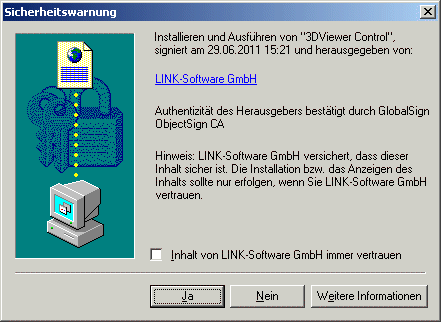
Afterwards, our three-dimensional company logo should be visible at the top of this webpage within a moment.
After the automatic download of the CAB file and prior to installation of the 3DViewer Control there might show up a light yellow information bar at the top border of the Internet Explorer window containing a notice that an add-on is about to be installed.
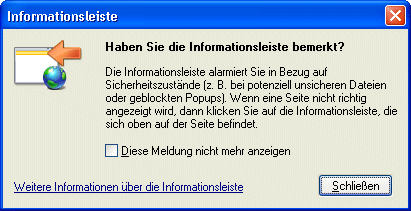
(Please, click on Close if this dialog shows up.)
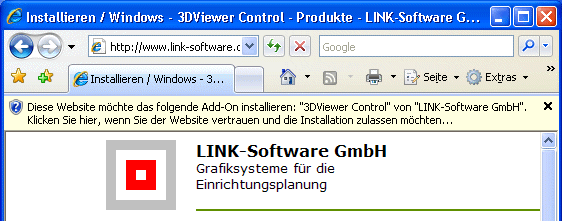
Click onto the light yellow information bar first, please, and afterwards onto Install ActiveX Control... within the menu.
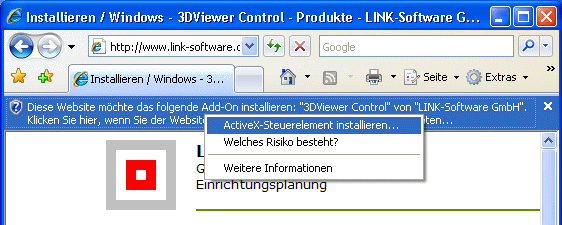
In the following security warning the browser asks you if you want to install the software 3DViewer Control published by LINK-Software GmbH. Please, click Install within the dialog.

Afterwards, our three-dimensional company logo should be visible at the top of this webpage within a moment.
After the automatic download of the CAB file and prior to installation of the 3DViewer Control there might show up a light yellow information bar at the top border of the Internet Explorer window containing a notice that an add-on is about to be installed.
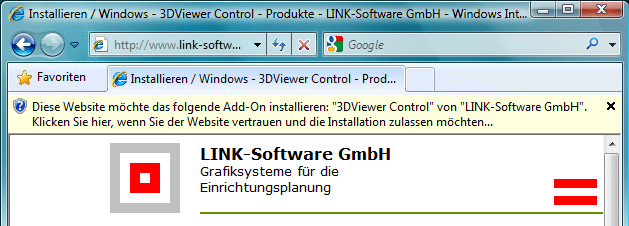
Click onto the light yellow information bar first, please, and afterwards onto Install this add-on... within the menu.
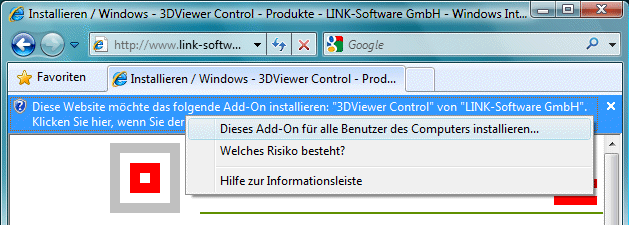
In the following security warning the browser asks you if you want to install the software 3DViewer Control published by LINK-Software GmbH. Please, click Install within the dialog.

Afterwards, our three-dimensional company logo should be visible at the top of this webpage within a moment.